แสดงบทความที่มีป้ายกำกับ wing xp แสดงบทความทั้งหมด

วันจันทร์ที่ 14 กุมภาพันธ์ พ.ศ. 2554

Custom Embroidery Service

Custom Embroidery

Today the vast majority of embroidery companies (especially those that do custom embroidered shirts) use digitized embroidery. With digitized embroidery, the process of creating custom embroidered shirts has become even easier. The entire process can be automated now as the design is simply input through software into an embroidery machine that does it all for you. This allows for an even more widespread commercialization of embroidery, as the digital designs can easily be sent through the internet to companies now.

If you are to go out on a hunt for a retailer that does custom embroidered shirts, beware; quality is everything. You do not want to get a shirt that you paid a large amount for online only to find out that after a single was the shirt is ruined. It is suggested that you go with a retailer that is not only reputable, but does digitized embroidery. This way you can create any design you would like and send it to them to be printed on the shirt. Some ways to find out if the company is reputable or not: take a look using search engines, look at forums, and ask around. There are many ways to find reviews on embroidery services online. Good luck with your search!
If you are looking for people who do this for you. Guarantee quality. By professional team.

We do for high quality machine embroidery digitizing with all new styles including : 3D foam embroidery, Custom patches, Lace Embroidery, Cross stitches, Puff embroidery, Applique, and more... Our pricing does not depend on stitches counting, We price by complexity of the design and artwork. Please contact us for stitches counting quotation and price, You will be surprise by our low price.

http://sewnke-emb.blogspot.com

วันศุกร์ที่ 21 พฤษภาคม พ.ศ. 2553

บทเรียน การตีลายปัก ด้วย wing xp

บทที่ 1 การเริ่มต้นการใช้งาน Wings XP by www.sewsense.com

1.เมื่อลงโปรแกรมไว้ในเครื่องเสร็จเรียบร้อยแล้ว ที่หน้าเดสทอป จะมีไอคอน eXPerience ดังรูปให้ดับเบิ้ลคลิ๊กเพื่อเริ่มต้นการใช้งาน

2.เมื่อเข้าสู่โปรแกรม จะเป็นหน้าว่าง ๆ สำหรับการเริ่มต้นการสร้างลายปักให้กดไปที่ New แต่ถ้าเป็นการเปิดลายปักที่มีอยู่แล้วให้กดไปที่ Open

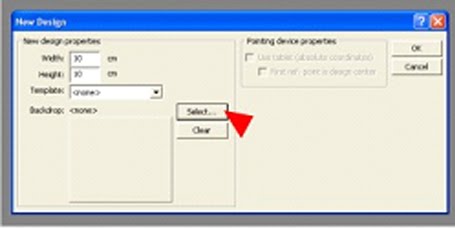
3.โปรแกรมจะขึ้นหน้าต่าง New design ขึ้นมาเพื่อให้ตั้งค่าขอบเขตของลายปัก ให้เลือกขนาดลายปักที่เราต้องการโดยที่
Width จะเป็นการตั้งความกว้างของลายปัก หรือ สะดึงที่ต้องการมีหน่วยเป็น เซ็นติเมตร
Height จะเป็นการตั้งค่าความสูงของลายปัก หรือ สะดึงที่ต้องการมีหน่วยเป็น เซ็นติเมตร
เมื่อตั้งค่าเสร็จแล้วให้กดปุ่ม OK

4.ตัวโปรแกรมก็จะพร้อมเริ่มต้นในการตีลายปักกันแล้ว

5.ในกรณีที่เรามีอาร์ตที่ทำไซส์ไว้แล้ว ให้กด select เพื่อเลือกอาร์ต ไม่ต้องใส่ไซส์ โปรแกรมจะตั้งค่าให้ตามอาร์ตโดยอัตโนมัติ